Showing posts with label java. Show all posts

Friday, September 02, 2011

Programming verbiage

Which is a better style?

 Style 1:

boolean checkNum(int x) {
   if (x > 10) {
       return true;
   }
   else {    // actually else {} is unnecessary
       return false;
    }
}


Style 2:


boolean checkNum(int x) {

       return (x > 10);
}


Though I find style 1 more often, specially in the code written by rookies, I prefer style 2. It is short and crisp.

Wednesday, November 24, 2010

Upgrade JPivot 1.8 to Mondrian 3.3.x

Like me, if you are stuck with last (old) release of Jpivot 1.8 with embedded Mondrian version 3.0 and want to upgrade to latest Mondrian (community version) release 3.3.x then, I have a solution. JPivot sourceforge site is not uptodate with the Mondrian ROLAP engine and there are several bugs which have been fixed in latest release of Mondrian.

In my environment (Struts 1.2, JBoss 4.x, Tomcat 5.x) simply replacing the mondrian.jar with latest jar library from Mondrian Sourceforge project does not work. It fails with several ClassNotFoundException and/or NoSuchMethodError during runtime. Here is what I did and it worked fine:

  1. Download latest Mondrian distribution
  2. Expand the dowloaded jar archive
  3. Navigate to WEB-INF/classes in the expanded location
  4. Create jpivot.jar from classes inside WEB-INF/classes directory e.g. using jar command line tool as shown below. Run this command inside WEB-INF/classes directory.
  • jar cvfz jpivot.jar com/*

5. Replace the jpivot.jar inside the expanded mondrian/lib directory with the jpivot.jar created above

6. Copy all the jar files in the lib directory (including new jpivot.jar) to your deployment location. Voila, you have upgraded JPivot 1.8 to the latest mondrian (3.3) release.

Enjoy!

Friday, September 03, 2010

JPivot/Mondrian + Struts 1.x file upload issue

After we integrated JPivot (front-end for Mondrian) library in one of our Struts 1.x based web application, all file uploads working fine so far, started to fail with NullPointerException (NPE). JPivot request filter is configured to intercept all requests for action (e.g. *.do). I could not find direct discussion about this issue on Google.

After debugging for few hours myself, noticed that JPivot RequestFilter intercepts and consumes the HTTP multipart request stream through a MultipartEnabledRequest wrapper even before it reaches Struts controller. Therefore FormFile object is null in FormBean.

The simple solution that worked was to extend the JPivot RequestFilter class and override doFilter(), something like shown below and use this custom filter in place of default JPivot RequestFilter.

...
import com.tonbeller.wcf.controller.RequestFilter;

/**
* This extension modifies default behavior of JPivot controller for file uploads
* (multipart requests) . It allows Struts layer to handle such requests rather
* than processing itself.
*
* @author bjha
*/
public class MyJpivotFilter extends RequestFilter {

@Override
public final void doFilter(
ServletRequest req,
ServletResponse res,
FilterChain fc) throws IOException, ServletException {


if( isMultipartRequest( req ) ){
//let Struts handle upload
fc.doFilter(req, res);
return;
}

super.doFilter(req, res, fc);
}


static boolean isMultipartRequest(ServletRequest req) {

if (req instanceof HttpServletRequest) {

String reqMethod = ((HttpServletRequest) req).getMethod();

if ( reqMethod != null
&&
"post".equals(reqMethod.toLowerCase())) {

String content = req.getContentType();
return (
content != null
&&
content.toLowerCase().contains("multipart/form-data"));
}
}

return false;
}
}


Another option that could work would be to configure JPivot RequestFilter not to intercept requests for upload URIs via web.xml or use commons-fileupload library to handle uploads.

Tuesday, April 06, 2010

Values of javac @SuppressWarnings

Legal values for the annotation @SuppressWarnings are compiler dependent, except unchecked, which is required by JLS.

I could find a listing for supported values in Eclipse IDE here. However, what is supported in Sun's (now Oracle) JDK is not well published. But, a little help from Sun JDK javac divulges the supported list as shown below:

[bjha@xxx]$ uname -rsp
Linux 2.6.13.5 x86_64

[bjha@xxx]$ javac -version
javac 1.6.0_07

[bjha@xxx]$ javac -X
...
-Xlint:{all,cast,deprecation,divzero,empty,unchecked,fallthrough,path,serial,finally,overrides,-cast,-deprecation,-divzero,-empty,-unchecked,-fallthrough,-path,-serial,-finally,-overrides,none}Enable or disable specific warnings
...
...
These options are non-standard and subject to change without notice.

Monday, February 22, 2010

An auto-deleting FileInputStream

Sometimes, we need to read some data from a FileInputStream and, after reading it, delete the underlying file automatically by calling close(). This is not supported in java as of J2SE v1.6. However, we can achieve this by first calling close() on InputStream and then calling File.delete(). Something like:

File f = new File("c:\\xyz...");
FileInputStream fis = new FileInputStream(f);
//read from fis
...
...
fis.close();
f.delete();

Above works, but it is quite verbose, especially when we have to do this on multiple files. It becomes a chore. I present below a class which encapsulates this behavior in itself. We do not have to call f.delete() separately. Calling fis.close() will also delete the file automatically.

*** =========== ***

import java.io.File;
import java.io.FileInputStream;
import java.io.FileNotFoundException;
import java.io.IOException;
import java.util.logging.Level;
import java.util.logging.Logger;


/**
* A {@link FileInputStream} which (optionally) deletes the
* underlying file when the stream is closed.
*
* @author BJ
*/
public class AutoDeleteOnCloseFileInputStream extends FileInputStream{

private static final Logger log = Logger.getAnonymousLogger();

/**
* Underlying file object
*/
private File fileObj;


/**
* Flag to control auto-delete of file on close()
*/
private final boolean deleteOnClose;


/**
* Is underlying file stream closed. Becomes true after close()
* is invoked.
*/
private boolean isClosed;


/**
* Was underlying File object deleted.
*/
private boolean isDeleted;


/**
* Creates a fileInputStream wrapped around the given file and deletes the
* file when the FileInputStream is closed.
*
* @param file
*
* @throws FileNotFoundException
*/
public AutoDeleteOnCloseFileInputStream(File file)
throws FileNotFoundException {
this(file, true);
}


/**
* Creates a fileInputStream wrapped around the given file.
*
* @param file
* @param deleteOnClose
*
* @throws FileNotFoundException
*/
public AutoDeleteOnCloseFileInputStream(
final File file,
final boolean deleteOnClose) throws FileNotFoundException {
super(file);
this.fileObj = file;
this.deleteOnClose = deleteOnClose;
isClosed = false;
isDeleted = false;
}


/**
* @return boolean flag, true if the file should be deleted on close().
* Default is true.
*/
public final boolean isDeleteOnClose() {
return deleteOnClose;
}


/**
* @return is file deleted (after close)
*/
public boolean isDeleted() {
return isDeleted;
}


/**
* Closes the underlying FileInputStream and also deletes the
* file object from disk if, the isDeleteOnClose()
* is set to true.
*
* @see java.io.FileInputStream#close()
*/
@Override
public void close() {

if( isClosed ) {
log.finer("close()- already closed: "+ this);
return; //no-op
}


log.fine("close()- closing: "+ this);
isClosed = true;

try {
super.close();
if( isDeleteOnClose() ) {
isDeleted = fileObj.delete() ;
}
}
catch (IOException e) {
log.log(Level.WARNING, "Failed to close() stream: " + this, e);
}
catch (RuntimeException e) {
log.log(Level.WARNING, "Failed to delete(): " + fileObj, e);
}

log.info("close()- file [" + fileObj + "] deleted: "+ isDeleted);
fileObj = null;
}


@Override
public String toString() {

String defaultStr = super.toString();

try {
StringBuilder sb = new StringBuilder();
sb.append(defaultStr)
.append("{")
.append("File=").append(fileObj).append(", ")
.append("File size=").append(fileObj == null ? -1L : fileObj.length()).append(", ")
.append("deleteOnClose=").append(deleteOnClose).append(", ")
.append("isClosed=").append(isClosed).append(", ")
.append("isDeleted=").append(isDeleted)
.append("}");
return sb.toString();
}
catch(RuntimeException e){
log.log(Level.INFO, "Failed to stringify", e);
return defaultStr;
}
}


//For testing. Can be removed w/o any loss of functionality
public static void main(String[] args) throws IOException {
File f =File.createTempFile("temp_file", ".tmp");
FileInputStream fis = new AutoDeleteOnCloseFileInputStream(f);

System.out.println("*** Before close: " + fis);
System.out.println("Temp file exists: "+ f.exists());
fis.close();
System.out.println("*** After close: " + fis);
System.out.println("Temp file exists: "+ f.exists());
}
}


Here is the sample output, when this program is run:


** Before close: AutoDeleteOnCloseFileInputStream@42e816{File=C:\DOCUME~1\BIMALE~1\LOCALS~1\Temp\temp_file49625.tmp, File size=0, deleteOnClose=true, isClosed=false, isDeleted=false}
Temp file exists: true
Feb 22, 2010 2:24:34 PM AutoDeleteOnCloseFileInputStream close
INFO: close()- file [C:\DOCUME~1\BIMALE~1\LOCALS~1\Temp\temp_file49625.tmp] deleted: true
*** After close: AutoDeleteOnCloseFileInputStream@42e816{File=null, File size=-1, deleteOnClose=true, isClosed=true, isDeleted=true}
Temp file exists: false

Friday, February 12, 2010

Remove trailing white-spaces in Eclipse

Often, we need to quickly remove the trailing spaces (at the end) in the line. Eclipse does not come pre-configured with a shortcut for this in (java) editor perspective (I am using Europa release 3.3.2) . However, it is very easy to create one yourself, like following:

1. On menu choose Window -> Preferences ->General ->Keys
2. Filter the shortcuts for "remove"
3. Follow the image below. I have chosen ctrl+alt+backspace as shortcut key.

That is all you need. Now, while editing any source file, just hit the combo ctrl+alt+backspace to remove the (unnecessary) white-spaces from end of lines.

Friday, November 06, 2009

Eclipse, Ant and java.lang.OutOfMemoryError

Launching Ant builds from Eclipse sometimes gives following error

[javac] Compiling 941 source files to C:\xxx
[javac] The system is out of resources.
[javac] Consult the following stack trace for details.
[javac] java.lang.OutOfMemoryError: Java heap space
...

After a bit of Google and experimentation, this is what works for me. Basically changed the JRE settings to use a bigger chunk of memory (Go to Window ->Preferences ->Installed JREs -> Default JRE -> Edit) for heap and stack like

-Xms256m -Xmx512m -Xss1m -XX:MaxPermSize=128m

Thursday, July 09, 2009

How to compute MD-5 and SHA-1 hash of files from Eclipse

Often I need to calculate MD-5 and/or SHA-1 hash of files in my workspace. I find it annoying to leave Eclipse and run command line tool every time I have to know these hashes.

Here is a trick I devised to get this done quickly without leaving the IDE. This is for Eclipse running on Windows XP but, can be applied for other operating systems too.

1. Download any free command line tool (or roll your own) to compute hashes. I chose Microsoft's free utility called FCIV (File Checksum Integrity Verifier).

2. Extract FCIV tool at a convenient location e.g. c:\fciv\fciv.exe

3. Configure "External Tools" in Eclipse (go to Menu -> Run ->External tools -> Open External tools Dialogue) for FCIV as shown in the diagram below. You can organize the tool in your "favorites" for easy access.


4. Configure a shortcut key to launch FCIV tool.
Go to Menu -> Window -> Prefrences -> General -> Keys and filter for "external". Create a shortcut key combination (e.g. Alt+L) for "Run Last Launched External Tool". Use this dialogue to configure a shortcut for "External tool..." too, e.g. Alt+R.


This is all that is needed to configure the FCIV tool.

5. Now, select a resource in your workspace and press "Alt+R". This will bring up the "External Tools" dialogue.

6. Select the FCIV tool from the dialogue.

7. This will print both MD5 and SHA-1 of the selected file in the console window at the bottom of Eclipse IDE.

8. For computing hashes of next file, just press shortcut "Alt+L".

Tip:
To compute hashes of all the files in a directory, select at directory and use the shortcut "Alt+L".

Hope it helps.

Wednesday, December 03, 2008

Issue with latest Jawr 2.6

I have been using JAWR library for past six months in my project and found it very well documented and very stable too. But, yesterday I was surprised to find an issue with its latest (2.6) release.

A new configuration feature jawr.csslinks.flavor has been added to configure how <link> CSS tag is rendered. But, by default, <link>tag is not terminated with "/>" as claimed in the jawr taglib docs. With 2.6 release (Nov 25,2008), my CSS links which worked fine earlier, started to render as follows:
<link rel="stylesheet" type="text/css" media="screen" 
href
="/xxx/gzip_N173773858/bundles/base.cssnull
This broke my screen layout.

Adding jawr.csslinks.flavor = xhtml in jawr.properties solves this issue.

Tuesday, November 18, 2008

Eclipse update manager not launching

Recently I faced an unusual issue with Eclipse. The update manager would not launch. When I clicked on Help -> Software Updates -> Find and Install nothing happened. The issue was similar to the one reported here.

I started the eclipse with -debug option. On the launcher console, it logged something like bookmarks.xml file could not be read due to premature end of file. Checked file C:\eclipse\configuration\org.eclipse.update\bookmarks.xml, it was indeed 0 (zero) bytes!! How did that happen? Probably, a scandisk run truncated the damaged file after power failure which is common in Pune these days :-(

Anyways, I restored the bookmarks.xml file with some update sites that I could remember:

<?xml version="1.0" encoding="UTF-8"?>
<bookmarks>
<site name="Regex tester" url="http://brosinski.com/regex/update" web="false" selected="false" local="false">
<site name="Code Style checker" url="http://eclipse-cs.sourceforge.net/update" web="false" selected="false" local="false">
<site name="Find bugs" url="http://findbugs.cs.umd.edu/eclipse/" web="false" selected="false" local="false">
<site name="ByteCode viewer" url="http://download.forge.objectweb.org/eclipse-update/" web="false" selected="false" local="false">
<site name="Multi-project plug-in" url="http://eclipse-tools.sourceforge.net/updates/" web="false" selected="false" local="false">
<site name="PyDev python IDE" url="http://pydev.sourceforge.net/updates/" web="false" selected="false" local="false">
<site name="Jboss tools" url="http://download.jboss.org/jbosstools/updates/stable/" web="false" selected="false" local="false">
<site name="Eclipse Europa" url="http://download.eclipse.org/releases/europa/" web="false" selected="true" local="false">
</bookmarks>
Eclipse is now starting fine and launching the update. Only issue is that I have lost some update sites bookmarked earlier. Probably by restoring the damaged bookmarks.xml file with an empty content, something like given below, might also help eclipse to launch the update manager and the bookmarks can be added back later from Eclipse update manager.

<?xml version="1.0" encoding="UTF-8"?>
<bookmarks>
</bookmarks>

Wednesday, April 09, 2008

java.util.ConcurrentModificationException

Often, while working with maps and other collection utilities in Java you may come across this exception:

Exception in thread ... java.util.ConcurrentModificationException
at java.util.Hashtable$Enumerator.next(Unknown Source)
at ...


A quick look at the API documentation of ConcurrentModificationException says:
"This exception may be thrown by methods that have detected concurrent modification of an object when such modification is not permissible. For example, it is not generally permissible for one thread to modify a Collection while another thread is iterating over it..."
Now this may not be very useful for newbies. They may be left wondering about multi-threading, concurrent access etc. Given below is a sample code which is single threaded, yet, it fails with ConcurrentModifcationAccess. In this code I am trying to remove keys that end with digit "5" from a Map:

public class MapTest {

public static void main(String[] args) {
//create a sample Map
Map<String, String> map = new Hashtable<String,String>();
map.put("key1", "value100");
map.put("key2", "value200");
map.put("key3", "value300");
map.put("key4", "value400");
map.put("key5", "value500");
map.put("key55", "value550");
map.put("key6", "value600");

System.out.println("mappings before: "+map);

//retrieve the set of Keys in the map
Set<String> keySet = map.keySet();

//iterate over keys and remove
// those which ends with "5"
for(String key : keySet) {
if(key.endsWith("5" )) {
keySet.remove(key);
}
}

System.out.println("mappings after: "+map);
}

}

When you run this code it will throw concurrent modification exception. Now try the following sample. Changed code is highlighted.

public class MapTest {

public static void main(String[] args) {
//create a sample Map
Map<String, String> map = new Hashtable<String,String>();
map.put("key1", "value100");
map.put("key2", "value200");
map.put("key3", "value300");
map.put("key4", "value400");
map.put("key5", "value500");
map.put("key55", "value550");
map.put("key6", "value600");

System.out.println("mappings before: "+map);

//retrieve the set of Keys in the map

Iterator<String> keySetItr = map.keySet().iterator();
while( keySetItr.hasNext()) {
String key = keySetItr.next();
if(key.endsWith("5" )) {
keySetItr.remove();
}
}

System.out.println("mappings after: "+map);
}

}
This code runs fine. Why?

The evil is in the code:
for(String key : keySet) {
...
keySet.remove(key);

The for(...) actually opens an iterator internally and when we remove the key from KeySet this iterator logic breaks, throwing the ConcurrentModificationException. To avoid this one should use the second example given above, where same Iterator (keySetItr) is used both for iteration and removing the keys.

Wednesday, June 13, 2007

Code quality

Computers are good at following instructions, but not at reading your mind
Dr. Knuth surmised this and the following snippet of a java code written by a professional programmer demonstrate this. What the programmer wanted was to find if the string value is empty. Look at the way computer is told to determine this:

// check for empty value
static boolean isEmpty(String value) {

Boolean isEmpty = new Boolean(false);
if ((value == null) || (value.length() == 0))
isEmpty = true;

return isEmpty.booleanValue();

}
Do you see, why I like to be in this profession and what I hate about it!
:-)

Tuesday, May 22, 2007

JBoss, JAXB and JDK 1.6

While using JBoss 4.0.2, JAXB 2.1 and JDK 1.6 (a.k.a J2SE 6.0) if you get a linkage error similar to one discussed here then you should put jaxb-api.jar from JAXB RI into the endorsed directory used by Jboss. Putting it under jre/lib/endorsed directory has no affect as JBoss overrides the endorsed directory with its own. Place the jaxb-api.jar into $jboss-home/lib/endorsed directory instead. It should solve the linkage problem.

Friday, March 02, 2007

Moving On ...

I was a pure java/e-App techie until about year and half ago when my present employer made this tempting offer to lead their VoIP/Java initiative at Pune. I joined them leaving behind the comfort and security of a job from $5 billion giant. The new job, however, soon changed due to the changing business plans and they decided to re-engineer everything that existed in Java to C#/.NET. I stayed on. Left Java and picked up strangers like C# and .NET along with SIP, IMS, Soft-switch etc in this VoIP/C# journey. Now, with first generation of the craft already in the market and my team here quite capable of taking it further, I have decided to move on ...

What Next?

So far, I do not have a firm destination. Google was enticing but, it did not work out. SAS is way too far from home and GSL appeared puerile. Right now I am talking to a fledgling company that is yet to establish presence in India... let us see what happens!

Thursday, November 23, 2006

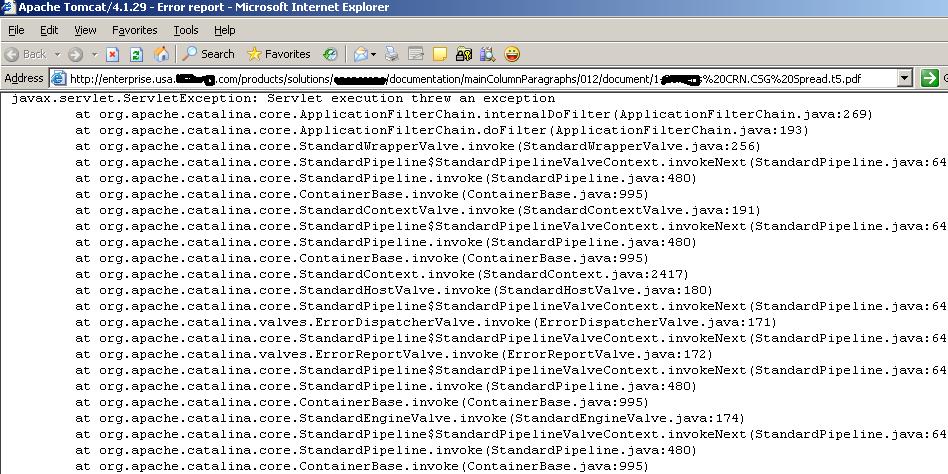
Real World Enterprise Application!

Pic-1


Pic-2


I have veiled the brand and company name to keep it anonymous to avoid embarrassment :-)

Tuesday, November 14, 2006

Recipe for inter-operating a C# Symmetric Encryption code with OpenSSL

Interoperability is not a difficult thing to achieve. Yet, it is not an easy thing to get either- predominantly because the relevant information are widely fragmented and even Google fails to compact all of them together- leaving you rummaging through a pile of web pages to fish out really useful information from them. I am posting this for my own help- may be in future I will need to come back here to look at this again to see what I did!

Problem # 1: Quirks of Hex key in OpenSSL

I needed to write some C# code which will take in a plain text file and run some Symmetric Encryption routine over them using a given Initialization Vector (IV) and a Secret Key (SK). The output will be some encrypted binary data which should be decoded by the OpenSSL tool. Basically, I wanted following OpenSSL command line to work for me always:

$openssl enc [-aes-128-cbc] -in <CipherData.bin> -out <ClearData.txt> -d -K <SomeSecretKey> -iv <SomeIV>

Here <CipherData.bin> is the encrypted file generated by C#/.NET crypto routine. My aim is to support these algorithms: AES, 3DES, RC2 and DES and at least support following chaining modes: CBC, ECB and CFB.

With -–K (and -iv) option, OpenSSL expects only Hexadecimal secret key (and IV) string whose valid size differ for different algorithms employed. The input hex string is converted into a byte array and used as SK (and IV). The interesting part is that OpenSSL and .NET crypto behave differently if you do not supply a valid length hex stream against these data. While, OpenSSL intelligently (and silently) pads the byte array with trailing 0s to make up for the shortfall in “legal” size or truncate it if the same goes beyond the adequate size, the C#/.NET crypto code dies with an exception, leaving you puzzled- what went wrong? Sometimes, to baffle us more, a secret key which had worked in C#/.Net seems to give you "“bad crypto"” in OpenSSL and vice versa.

The crux is how you encode (and decode) a Hex string into byte[] for SK and IV. Basically the point to remember is that a simple Hex text like "“CAFEBABE"” is 8 ASCII character (8 bytes array) but, becomes 4 bytes array when converted to Hex encoding. I have a sample HexUtil C# class which illustrates these things... wait for next post.

Problem # 2: Line breaks in base64 encoding

By default (-a or -base64 switch) OpenSSL inserts/expects a line break (new line character) after every 64th character printed in the encoded/decoded stream. But C#/.NET Libraries v1.1 does not insert a line break automatically in the generated base64 encoded string. Hence, there is some incompatibility between OpenSSL and C# Base64 converter. I have read that in .NET v2.0, Microsoft has added an additional API to insert line breaks in the generated Base64 strings [add link ?]. Meanwhile, I figured out that there is a command line switch in OpenSSL to disable the default line break behavior in the tool. I used following OpenSSL command to successfully decode the Base64 texts generated by C# code:

$openssl enc -a -A -d -in <B64EncryptedData.txt> -out <B64EncryptedData.txt.out>

Note the extra -A switch in the command line!

Wednesday, July 26, 2006

Getting rid of Null Pointers

NullPointerException or Null Object Reference errors are so common in any Object Oriented programming languages, be it ubiquitous Java or C#, that programmers have accepted it as a 'feature'. This happens when a reference (an object handle) pointing to ‘no-where’ is called in to service a request during the execution of a program. In the traditional languages like C, it would be a memory location without any serviceable address assigned. What is worse is that, such creepy things stay unnoticed while building the executable and surface only when someone uses the ‘shipped’ program. This not only leads to the annoyance and frustration to the consumer of the program, but also reveals the ‘ability’ of the software developer to him/her. Just look at so many jokes floating around involving the software developer community.

Yesterday stayed awake till late in the night. I was trying to book a ticket at a well-known website and this is what I encountered on the screen:

java.lang.NullPointerException: null at org.apache.struts.taglib.template.InsertTag.doEndTag(InsertTag.java:133)
at booking._0002fbooking_0002fbookTicket_0002ejspbookTicket_jsp_
1._jspService

(_0002fbooking_0002fbookTicket_0002ejspbookTicket_jsp_1.java:485) at org.apache.jasper.runtime.HttpJspBase.service(HttpJspBase.java:126) at
javax.servlet.http.HttpServlet.service(HttpServlet.java:853) at org.apache.jasper.runtime.JspServlet$JspServletWrapper.service(JspServlet.
java:174) at org.apache.jasper.runtime.JspServlet.serviceJspFile(JspServlet.java:268)
at org.apache.jasper.runtime.JspServlet.service(JspServlet.java:381) at
javax.servlet.http.HttpServlet.service(HttpServlet.java:853) at com.broadvision.servlet.ServletContainer.service(ServletContainer.java:404
) at com.broadvision.servlet.BVRequestDispatcher.forward(BVRequestDispatcher.ja
va:133) at …

While, clearly above is a testimony to a poor QA activity, but, the responsibility of the coder is no less severe either. Actually, it perhaps mirrors a poor coding practice followed by him/her which went unnoticed throughout the entire SDLC.

There is very little that a language compiler can do to check and alert the coder if he/she is leaving a dangling reference attached to 'nothing' before the code actually runs and the OS detects that the program has tried to reach a location that is either out of bounds for the current code or it is not present in the universe (mem address space) at all. Therefore, all null pointers show up only at the first usage of a handle (reference or pointer) that points to a NULL location.

If surfacing unsolicited was not enough, such ‘runtime’ exceptions generally carry useless information along to be of any help during debugging, unless the coder has implemented a meticulous audit/tracing plan. Try to decipher what went wrong in the above exception message? Here the coder at least was fortunate to have a dorky build engineer who allowed to ship the software with debug information on (look at those source code line numbers) otherwise, stack trace would have been dumber with no evidence of what went wrong and where… I mean you would not find any line numbers and if the code was subjected to massive compiler optimization then it would loose every bit of its identity due to the mangling of information and sometimes further obfuscated by dynamic compilation by JITC.

So, as they say, prevention is the best cure. Do not write code that can suffer from such an ailment and writing code as given below is suicidal. In the following example I am trying to fetch some ‘textual’ information from a Database (DB).

String txtData = getCollectionFromDB().getSomeDataForNamedKey().getValue().trim()

This looks smart (?) But, IMHO usages like this is the single biggest source of null pointers and other hypodermic bugs.

Yes, in our DB, values can be "NULL" or there may not be a matching row to fetch. Practice of in lining many calls as above is a great source of null pointer exception especially, if the data is coming from outside your code 'boundary'. Here you have absolutely no control over what is coming to you. In the above snippet, all the method calls preceding the dot (.) operator could give you a null reference leading to the exception. E.g. trim() would fail on a null value returned by getValue(); getValue() would fail on a null Object fetched by getSomeDataForNamedKey() and so on.

Why would you write code like this? This programming practice does not save anything except may be some of your typing time and finger ache! Instead of being stingy on words and lines as above, try to break calls into individual ‘statement’ and combine such statements into a code block (example shown below). This not only yields a more robust code but, also makes code easier to comprehend. Whats more, the debugger tools will also report proper line numbers happily.

Map nameValuePairMap = getCollectionFromDB();

if( isNull(nameValuePairMap) )
{
//do Blah Blah
}
else
{
NameValuePair someNameValue = nameValuePairMap.GetSomeDataForKey();
// Do Null check
...
String dataValue = someNameValue.GetValue();
if( isNull(dataValue) )
{
txtData ="";
}
else
{
txtData = dataValue.trim();
}
...
}


Follow this and & > 80% of your programming bugs (especially Null pointers) would disappear.
Ask me how do I know that :-)


Tuesday, January 24, 2006

Invited to talk

Last Thursday I was at Sinhgad College of Science, Pune, to participate in their annual Industry Academia Forum (IAF). Prasanta too accompanied me. They had invited us to speak about Java.

About two hundred odd under graduate students of computer science had gathered in an auditorium to listen us. I spoke about genesis and uniqueness of Java and what makes it so popular. I had also compiled some interesting real world applications to demonstrate that Java can be used everywhere, right from e-Commerce, home networking, gadgets to space exploration. I could feel, most present there knew that java is limited to ubiquitous internet applications and shopping carts only. They were wide eyed after hearing how java powers Philips iPronoto and BMW in-dash infotainment or how Mars exploration was simulated using Java 3D imaging. Prasanta went deep and spoke about complex issues in enterprise applications like dealing with heterogeneous database, bridging isolated and disparate applications and how J2EE addresses such challenges.

This was my second such presentation. Earlier I had been to Wadia College. It is a always a great experience talking in front of such an audience and more so speaking about Java :-).

Hope, I could educate them about power and applications of Java and cleared some of their doubts...