Some websites use customized Google search (powered by Google etc) on their pages. If you try to access search service on such sites using Mozilla Firefox having Adblock Plus plugin (ABP) installed, then sometimes you will not get proper searched results or it may return a blank page. This is because ABP blocks the (third party) Google scripts from loading on the page. To overcome that, you will have to "white-list" such scripts in ABP. Checkout this post for more on this.
PS: this happens with ABP 1.2 and FF 3.6.6.
Friday, July 02, 2010


Sunday, May 16, 2010
Help Aashi
This is an unusual post, but very important. Given below is the excerpt of the mail from my friend Yash.
-------------------------------------------------------------------------
Lets fight the cancer- help the little girl.
-------------------------------------------------------------------------
Hey Bimalesh - here is a short writeup.
My niece Aashi is five year old living in Gurgaon, India suffering from blood cancer or Acute lymbhoblastic leukemia with CNS (Central nervous system) involvement. She has already undergone around 2 years of intensive chemotherapy but it is not helping her anymore as disease has relapsed in central nervous system. Only an Unrelated Bone Marrow Transplant (BMT) can save her life.
We have set up a website for her - http://www.helpsaveaashi.com . Details about her and her illness are on the website. Any donation from your end is very valuable. Your financial help will go towards Aashi's bone marrow transplant and treatment. Please let friends and people close to you know about this who may be interested to help.
Latest from 13th May 2010: There is a good news that doctors have found HLA typing match at NMDP. This is extremely positive. However, NMDP is going to do further screening on the donor. This news about initial match has been updated on the website and the doctors' match report will be put up in couple of days as well.
Thanks for your support. Please email me if you have any questions and/or suggestions.
We have set up a website for her - http://www.helpsaveaashi.com . Details about her and her illness are on the website. Any donation from your end is very valuable. Your financial help will go towards Aashi's bone marrow transplant and treatment. Please let friends and people close to you know about this who may be interested to help.
Latest from 13th May 2010: There is a good news that doctors have found HLA typing match at NMDP. This is extremely positive. However, NMDP is going to do further screening on the donor. This news about initial match has been updated on the website and the doctors' match report will be put up in couple of days as well.
Thanks for your support. Please email me if you have any questions and/or suggestions.
Best Regards
Yash
-------------------------------------------------------------------------
-------------------------------------------------------------------------
Lets fight the cancer- help the little girl.
Tuesday, April 06, 2010
Values of javac @SuppressWarnings
Legal values for the annotation @SuppressWarnings are compiler dependent, except unchecked, which is required by JLS.
I could find a listing for supported values in Eclipse IDE here. However, what is supported in Sun's (now Oracle) JDK is not well published. But, a little help from Sun JDK javac divulges the supported list as shown below:
[bjha@xxx]$ uname -rsp
Linux 2.6.13.5 x86_64
[bjha@xxx]$ javac -version
javac 1.6.0_07
[bjha@xxx]$ javac -X
...
-Xlint:{all,cast,deprecation,divzero,empty,unchecked,fallthrough,path,serial,finally,overrides,-cast,-deprecation,-divzero,-empty,-unchecked,-fallthrough,-path,-serial,-finally,-overrides,none}Enable or disable specific warnings
...
...
These options are non-standard and subject to change without notice.
I could find a listing for supported values in Eclipse IDE here. However, what is supported in Sun's (now Oracle) JDK is not well published. But, a little help from Sun JDK javac divulges the supported list as shown below:
[bjha@xxx]$ uname -rsp
Linux 2.6.13.5 x86_64
[bjha@xxx]$ javac -version
javac 1.6.0_07
[bjha@xxx]$ javac -X
...
-Xlint:{all,cast,deprecation,divzero,empty,unchecked,fallthrough,path,serial,finally,overrides,-cast,-deprecation,-divzero,-empty,-unchecked,-fallthrough,-path,-serial,-finally,-overrides,none}Enable or disable specific warnings
...
...
These options are non-standard and subject to change without notice.
Monday, February 22, 2010
An auto-deleting FileInputStream
Sometimes, we need to read some data from a FileInputStream and, after reading it, delete the underlying file automatically by calling close(). This is not supported in java as of J2SE v1.6. However, we can achieve this by first calling close() on InputStream and then calling File.delete(). Something like:
File f = new File("c:\\xyz...");
FileInputStream fis = new FileInputStream(f);
//read from fis
...
...
fis.close();
f.delete();
Above works, but it is quite verbose, especially when we have to do this on multiple files. It becomes a chore. I present below a class which encapsulates this behavior in itself. We do not have to call f.delete() separately. Calling fis.close() will also delete the file automatically.
*** =========== ***
Here is the sample output, when this program is run:
File f = new File("c:\\xyz...");
FileInputStream fis = new FileInputStream(f);
//read from fis
...
...
fis.close();
f.delete();
Above works, but it is quite verbose, especially when we have to do this on multiple files. It becomes a chore. I present below a class which encapsulates this behavior in itself. We do not have to call f.delete() separately. Calling fis.close() will also delete the file automatically.
*** =========== ***
import java.io.File;
import java.io.FileInputStream;
import java.io.FileNotFoundException;
import java.io.IOException;
import java.util.logging.Level;
import java.util.logging.Logger;
/**
* A {@link FileInputStream} which (optionally) deletes the
* underlying file when the stream is closed.
*
* @author BJ
*/
public class AutoDeleteOnCloseFileInputStream extends FileInputStream{
private static final Logger log = Logger.getAnonymousLogger();
/**
* Underlying file object
*/
private File fileObj;
/**
* Flag to control auto-delete of file on close()
*/
private final boolean deleteOnClose;
/**
* Is underlying file stream closed. Becomes true afterclose()
* is invoked.
*/
private boolean isClosed;
/**
* Was underlyingFileobject deleted.
*/
private boolean isDeleted;
/**
* Creates a fileInputStream wrapped around the given file and deletes the
* file when theFileInputStreamis closed.
*
* @param file
*
* @throws FileNotFoundException
*/
public AutoDeleteOnCloseFileInputStream(File file)
throws FileNotFoundException {
this(file, true);
}
/**
* Creates a fileInputStream wrapped around the given file.
*
* @param file
* @param deleteOnClose
*
* @throws FileNotFoundException
*/
public AutoDeleteOnCloseFileInputStream(
final File file,
final boolean deleteOnClose) throws FileNotFoundException {
super(file);
this.fileObj = file;
this.deleteOnClose = deleteOnClose;
isClosed = false;
isDeleted = false;
}
/**
* @return boolean flag, true if the file should be deleted on close().
* Default is true.
*/
public final boolean isDeleteOnClose() {
return deleteOnClose;
}
/**
* @return is file deleted (after close)
*/
public boolean isDeleted() {
return isDeleted;
}
/**
* Closes the underlyingFileInputStreamand also deletes the
* file object from disk if, theisDeleteOnClose()
* is set to true.
*
* @see java.io.FileInputStream#close()
*/
@Override
public void close() {
if( isClosed ) {
log.finer("close()- already closed: "+ this);
return; //no-op
}
log.fine("close()- closing: "+ this);
isClosed = true;
try {
super.close();
if( isDeleteOnClose() ) {
isDeleted = fileObj.delete() ;
}
}
catch (IOException e) {
log.log(Level.WARNING, "Failed to close() stream: " + this, e);
}
catch (RuntimeException e) {
log.log(Level.WARNING, "Failed to delete(): " + fileObj, e);
}
log.info("close()- file [" + fileObj + "] deleted: "+ isDeleted);
fileObj = null;
}
@Override
public String toString() {
String defaultStr = super.toString();
try {
StringBuilder sb = new StringBuilder();
sb.append(defaultStr)
.append("{")
.append("File=").append(fileObj).append(", ")
.append("File size=").append(fileObj == null ? -1L : fileObj.length()).append(", ")
.append("deleteOnClose=").append(deleteOnClose).append(", ")
.append("isClosed=").append(isClosed).append(", ")
.append("isDeleted=").append(isDeleted)
.append("}");
return sb.toString();
}
catch(RuntimeException e){
log.log(Level.INFO, "Failed to stringify", e);
return defaultStr;
}
}
//For testing. Can be removed w/o any loss of functionality
public static void main(String[] args) throws IOException {
File f =File.createTempFile("temp_file", ".tmp");
FileInputStream fis = new AutoDeleteOnCloseFileInputStream(f);
System.out.println("*** Before close: " + fis);
System.out.println("Temp file exists: "+ f.exists());
fis.close();
System.out.println("*** After close: " + fis);
System.out.println("Temp file exists: "+ f.exists());
}
}
Here is the sample output, when this program is run:
** Before close: AutoDeleteOnCloseFileInputStream@42e816{File=C:\DOCUME~1\BIMALE~1\LOCALS~1\Temp\temp_file49625.tmp, File size=0, deleteOnClose=true, isClosed=false, isDeleted=false}
Temp file exists: true
Feb 22, 2010 2:24:34 PM AutoDeleteOnCloseFileInputStream close
INFO: close()- file [C:\DOCUME~1\BIMALE~1\LOCALS~1\Temp\temp_file49625.tmp] deleted: true
*** After close: AutoDeleteOnCloseFileInputStream@42e816{File=null, File size=-1, deleteOnClose=true, isClosed=true, isDeleted=true}
Temp file exists: false
Friday, February 12, 2010
Remove trailing white-spaces in Eclipse
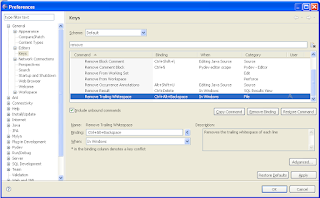
Often, we need to quickly remove the trailing spaces (at the end) in the line. Eclipse does not come pre-configured with a shortcut for this in (java) editor perspective (I am using Europa release 3.3.2) . However, it is very easy to create one yourself, like following:
1. On menu choose Window -> Preferences ->General ->Keys
2. Filter the shortcuts for "remove"
3. Follow the image below. I have chosen ctrl+alt+backspace as shortcut key.
That is all you need. Now, while editing any source file, just hit the combo ctrl+alt+backspace to remove the (unnecessary) white-spaces from end of lines.
1. On menu choose Window -> Preferences ->General ->Keys
2. Filter the shortcuts for "remove"
3. Follow the image below. I have chosen ctrl+alt+backspace as shortcut key.
That is all you need. Now, while editing any source file, just hit the combo ctrl+alt+backspace to remove the (unnecessary) white-spaces from end of lines.

Sunday, January 31, 2010
Added JBLs on WagonR
This is my eight year old Suzuki WagonR.
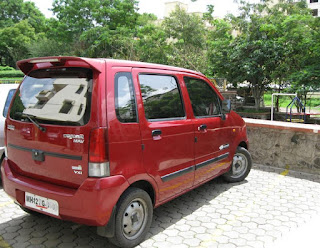
A pair of new JBLs made her sound peppier :)

Also, eliminated some rattles in the dash.


A pair of new JBLs made her sound peppier :)

Also, eliminated some rattles in the dash.

Monday, December 14, 2009


Friday, December 11, 2009
Work away from work
Did not want the accumulated leaves to lapse at the year end. Hence took few days off from work. Staying at home whole day on a week day means- I will have to spend time in the garage :). Just finished servicing the bike today. Overhauled the gear box and primary drive and also the front forks. It rides like new now. Pleased with the effort and saved about 600/- rupees that is about 12 beers :P
+%28Medium%29.jpg)
+%28Medium%29.jpg)
+%28Medium%29.jpg)
+%28Medium%29.jpg)

+%28Medium%29.jpg)
+%28Medium%29.jpg)
+%28Medium%29.jpg)
+%28Medium%29.jpg)

Saturday, November 14, 2009
Back to cricket ground

Played a cricket match after three years today. We defeated Hitachi by six wickets in a local IT cup played at Khadki Cantt ground. I took to the ground like duck takes to water :D and affected one run-out, one caught behind and quite a few close stumping calls. The affect of keeping behind the stumps for 25 overs will be known only by night... need to stock ample Paracetamol at home .
Friday, November 06, 2009
Eclipse, Ant and java.lang.OutOfMemoryError
Launching Ant builds from Eclipse sometimes gives following error
[javac] Compiling 941 source files to C:\xxx
[javac] The system is out of resources.
[javac] Consult the following stack trace for details.
[javac] java.lang.OutOfMemoryError: Java heap space
...
After a bit of Google and experimentation, this is what works for me. Basically changed the JRE settings to use a bigger chunk of memory (Go to Window ->Preferences ->Installed JREs -> Default JRE -> Edit) for heap and stack like
-Xms256m -Xmx512m -Xss1m -XX:MaxPermSize=128m

[javac] Compiling 941 source files to C:\xxx
[javac] The system is out of resources.
[javac] Consult the following stack trace for details.
[javac] java.lang.OutOfMemoryError: Java heap space
...
After a bit of Google and experimentation, this is what works for me. Basically changed the JRE settings to use a bigger chunk of memory (Go to Window ->Preferences ->Installed JREs -> Default JRE -> Edit) for heap and stack like
-Xms256m -Xmx512m -Xss1m -XX:MaxPermSize=128m

Sunday, October 18, 2009

Tuesday, October 13, 2009

Saturday, October 10, 2009
.jpg)
.jpg)
.jpg)
Monday, October 05, 2009

Thursday, September 24, 2009

Friday, September 11, 2009
Airtel prepaid mobile service fraud
This one is a rant about pathetic service that I am getting from my mobile service provider.
For last several months, i.e. June to be precise, Airtel is sending unsolicited SMS disguised as a VAS (value added service) to my mobile and debiting my account Rs 3/- for each such SMS. The SMS comes from 290603 with such enchanting subjects like Tip Of the Day and Love Tip of The Day.
By now they have emptied all my prepaid balance and it has turned negative Rs (-) 30/- . I am denied to make any outside call or send sms due to this!! As per the law of the land no service provider can charge for VAS unless customer has explicitly subscribed it.
Apparently, I am not the first or last victim. There are many like me here, here and here. Just google airtel 290603 sms, there are hundreds of other hapless customers getting robbed like this. This is clearly helping them to swell the revenue at the cost of customers' hard earned money.
Their customer service helpline (121) is always busy. If you are fortunate enough to go beyond the call queue, you will find no menu to reach their phone officers to complain about this while countless emails to 121@airtel are auto acknowledged back with a standard reply- we are looking into this.
While I am taking this matter to the appropriate authorities, wanted this post to alert the users (and prospective customers) of Airtel's service about their fraudulent ways of fleecing money.
Check your (dwindling) prepaid balance- is it vanishing mysteriously?
For last several months, i.e. June to be precise, Airtel is sending unsolicited SMS disguised as a VAS (value added service) to my mobile and debiting my account Rs 3/- for each such SMS. The SMS comes from 290603 with such enchanting subjects like Tip Of the Day and Love Tip of The Day.
By now they have emptied all my prepaid balance and it has turned negative Rs (-) 30/- . I am denied to make any outside call or send sms due to this!! As per the law of the land no service provider can charge for VAS unless customer has explicitly subscribed it.
Apparently, I am not the first or last victim. There are many like me here, here and here. Just google airtel 290603 sms, there are hundreds of other hapless customers getting robbed like this. This is clearly helping them to swell the revenue at the cost of customers' hard earned money.
Their customer service helpline (121) is always busy. If you are fortunate enough to go beyond the call queue, you will find no menu to reach their phone officers to complain about this while countless emails to 121@airtel are auto acknowledged back with a standard reply- we are looking into this.
While I am taking this matter to the appropriate authorities, wanted this post to alert the users (and prospective customers) of Airtel's service about their fraudulent ways of fleecing money.
Check your (dwindling) prepaid balance- is it vanishing mysteriously?
Tuesday, August 25, 2009

Monday, August 17, 2009
Thursday, July 09, 2009
How to compute MD-5 and SHA-1 hash of files from Eclipse
Often I need to calculate MD-5 and/or SHA-1 hash of files in my workspace. I find it annoying to leave Eclipse and run command line tool every time I have to know these hashes.
Here is a trick I devised to get this done quickly without leaving the IDE. This is for Eclipse running on Windows XP but, can be applied for other operating systems too.
1. Download any free command line tool (or roll your own) to compute hashes. I chose Microsoft's free utility called FCIV (File Checksum Integrity Verifier).
2. Extract FCIV tool at a convenient location e.g. c:\fciv\fciv.exe
3. Configure "External Tools" in Eclipse (go to Menu -> Run ->External tools -> Open External tools Dialogue) for FCIV as shown in the diagram below. You can organize the tool in your "favorites" for easy access.

4. Configure a shortcut key to launch FCIV tool.
Go to Menu -> Window -> Prefrences -> General -> Keys and filter for "external". Create a shortcut key combination (e.g. Alt+L) for "Run Last Launched External Tool". Use this dialogue to configure a shortcut for "External tool..." too, e.g. Alt+R.

This is all that is needed to configure the FCIV tool.
5. Now, select a resource in your workspace and press "Alt+R". This will bring up the "External Tools" dialogue.
6. Select the FCIV tool from the dialogue.
7. This will print both MD5 and SHA-1 of the selected file in the console window at the bottom of Eclipse IDE.
8. For computing hashes of next file, just press shortcut "Alt+L".
Tip:
To compute hashes of all the files in a directory, select at directory and use the shortcut "Alt+L".
Hope it helps.
Here is a trick I devised to get this done quickly without leaving the IDE. This is for Eclipse running on Windows XP but, can be applied for other operating systems too.
1. Download any free command line tool (or roll your own) to compute hashes. I chose Microsoft's free utility called FCIV (File Checksum Integrity Verifier).
2. Extract FCIV tool at a convenient location e.g. c:\fciv\fciv.exe
3. Configure "External Tools" in Eclipse (go to Menu -> Run ->External tools -> Open External tools Dialogue) for FCIV as shown in the diagram below. You can organize the tool in your "favorites" for easy access.

4. Configure a shortcut key to launch FCIV tool.
Go to Menu -> Window -> Prefrences -> General -> Keys and filter for "external". Create a shortcut key combination (e.g. Alt+L) for "Run Last Launched External Tool". Use this dialogue to configure a shortcut for "External tool..." too, e.g. Alt+R.

This is all that is needed to configure the FCIV tool.
5. Now, select a resource in your workspace and press "Alt+R". This will bring up the "External Tools" dialogue.
6. Select the FCIV tool from the dialogue.
7. This will print both MD5 and SHA-1 of the selected file in the console window at the bottom of Eclipse IDE.
8. For computing hashes of next file, just press shortcut "Alt+L".
Tip:
To compute hashes of all the files in a directory, select at directory and use the shortcut "Alt+L".
Hope it helps.
Saturday, May 23, 2009

Subscribe to:
Posts (Atom)